Changelog

Follow new updates and improvements to Rebill.

Customize duplicated Payment Links without affecting the original
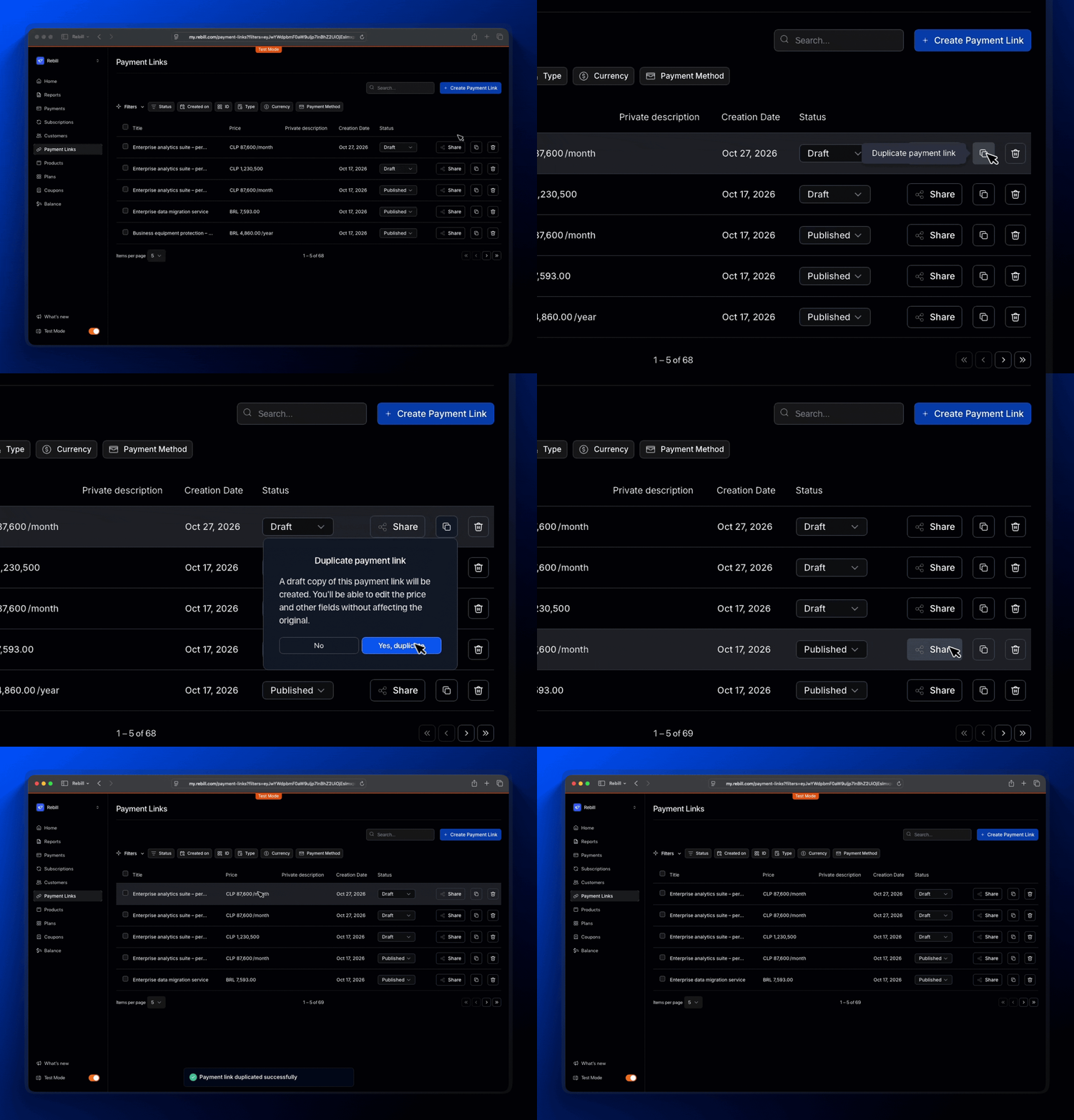
You can now duplicate a Payment Link and update its price, name, or other details without affecting the original link or other existing links.

Every copy gets its own product or plan

Previously, duplicating a Payment Link kept the copy connected to the same product or plan as the original. This meant changing the price or shared configuration could affect every link using that product or plan.

Now, when you duplicate a Payment Link, Rebill also creates an independent copy of its associated product or plan.

You can customize each link without modifying the original configuration.

For example: you have a Payment Link for your Monthly Pro Plan priced at $50. You duplicate it and change the copy's price to $40 for a promotion.

The original link stays at $50, and your existing customers remain unaffected.

More flexibility for every offer

Reuse your existing Payment Links to:

  • Create personalized offers: adjust prices or details for specific customers.

  • Test different pricing: create variations of the same product without changing the original.

  • Launch new cohorts: reuse an existing plan with different conditions.

All without rebuilding a Payment Link from scratch.

Good to know

  • Payment Links duplicated before this update retain their shared configuration. To customize one independently, create a new copy from the original link.

  • Product notes and photos aren't currently included when duplicating.

Available now in the Payment Links section of the dashboard.
SDK v1.17.45: Better fraud prevention and more reliable payment confirmations

This update improves checkout security and the payment experience with more device context for fraud prevention, more precise validations, and more reliable payment confirmations across QR codes and bank transfers.

More context for card payment fraud prevention

We've improved device information collection to give the antifraud engine more complete context when evaluating each transaction.

The SDK now performs an additional device capture through a hidden iframe, alongside the existing device fingerprint process.

This improvement applies to checkout, renewals, card updates, and saved-card flows that use this fraud screening.

If your account doesn't use this screening, your payment behavior remains unchanged.

More control over the card form

The form where customers enter their card details now loads from a dedicated Rebill domain: sdk-iframe.rebill.com.

This keeps card form hosting within Rebill's infrastructure.

Clearer validations before payment

We've improved full-name validation for customers with previously saved information.

If a first or last name is missing, checkout now displays the error before submitting the payment, preventing unnecessary payment attempts and making corrections easier.

More reliable QR and bank transfer confirmations

When customers leave checkout to complete a payment in their banking app, the SDK temporarily pauses payment status checks.

As soon as they return, the checks automatically resume.

This prevents status checks from being exhausted while the page is in the background and allows checkout to continue verifying payment confirmation.

More consistent checkout rendering

We've optimized icon loading so icons are requested only once per page, with automatic retries if a connection error occurs.

This helps maintain a consistent checkout experience, even on unstable connections.

Before you update

If your site uses a restrictive Content Security Policy (CSP), make sure to allow:

  • https://sdk-iframe.rebill.com in the frame-src directive so the card form loads correctly.

  • The domains required for device information collection, listed in our Fraud prevention guide.

If your site doesn't restrict these domains, no additional changes are needed.

Update the SDK

All improvements are available by updating the rebill package.

There are no breaking changes or code changes required, although restrictive CSP configurations may need adjustments.

Available in: rebill@1.17.45

npm install rebill@1.17.45

SDK v1.17.39: Faster checkout and a better 3DS experience

This release improves the payment experience in two key areas: checkout renders faster, and the 3D Secure flow for card payments handles authentication results more clearly and reliably.

Checkout shows up faster

Previously, the SDK waited for a payment method update before rendering the checkout form. That round trip could add around 500 ms before the customer saw the form.

With rebill@1.17.39, checkout renders first, and that update runs only when the customer submits the payment, safely and in order.

Customers see the payment form sooner, without changing when the payment method is charged or skipping the bank verification step.

A better 3DS experience

We also improved the 3D Secure flow for cards in cases where a bank-approved authentication could be misinterpreted.

When a bank approves a 3DS authentication without showing a challenge, the SDK now correctly recognizes that response as a valid approval.

And when a challenge is required, the iframe now allows biometric authentication and passkeys when supported by the bank.

How to use it

Update the rebill package to version 1.17.39.

There are no breaking changes and no integration changes required.

Available in: rebill@1.17.39

npm install rebill@1.17.39

Earlier updates